Wordpress Plugin Settings
Onesystem WordPress plugin is developed to operate with Onesystem, providing wordpress website CMS and onesystem integration.
User may choose the options and the level of integration. It synronizes all product and price content from Onesystem, account management and online reservation capabilities.
Colors
Dictionary
API
Shop settings
Other options
Updates
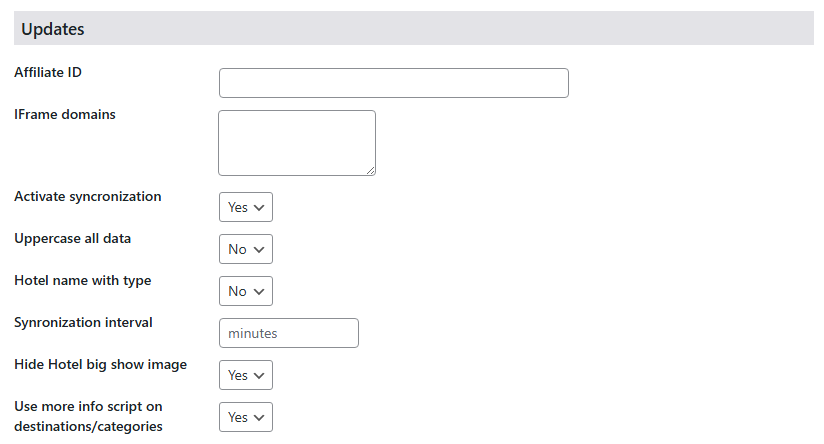
| Affiliate ID | Affiliates are the client cards forwarding website traffic and online reservation. Different then sub-agents system does not write reservation provision for Affiliates, but mark them as affiliate in system. Affiliates paid by as kick back, or this system may be used for following benefit of marketing operations. |
| IFRame domains | Iframe website is the same copy of the site with plugin, unless it does not have headers and footers. so subagents may put contents to their site from this url as iframe. |
| Activate syncronisation | Show that system syncronisation is active. (Deprecated) |
| Uppercase all data | It will convert all names to uppercase. |
| Hotel name with type | In system facility name and facility type are seperated. For example name is Ulusoy Kemer, facility type is Holiday Village. If you choose yes, plugin will create the page name as “Ulusoy Kemer Holiday Village” |
| Synronisation Interval | How often web data to be synronized. (Deprecated) |
| Hide Hotel big show image | To show/hide first photo of otel on the top of hotel page. |
| Use more info script | In case description text is so long in destination pages, it limits it and show a button for more info. |
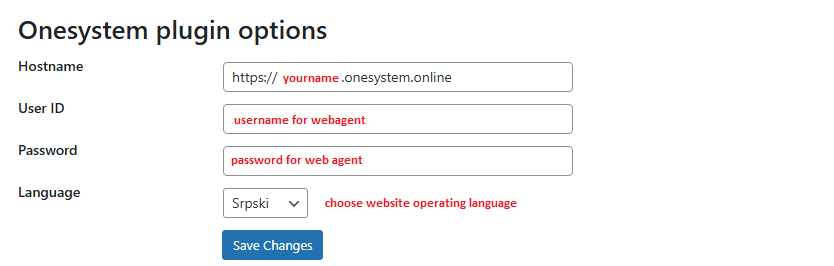
Onesystem plugin options
| Hostname | The url address of your company for onesystem |
| User ID | User created to manage website and online sales |
| Password | User password |
| Language | Language which this site operates. |
After you successfully save changes your connection between website and system is established.
* You will get an error in case you have problem with credentials.