
New Reservation
All reservation types in OneSystem require startup information. To start a new reservation follow the steps below.
- Open the OneSystem window on your browser.
- Select RESERVATION from the main menu tab.
- Select RESERVATIONLIST tab from the sub-menu.
- Click on New button from bottom menu. This will open the NEW RESERVATION window.
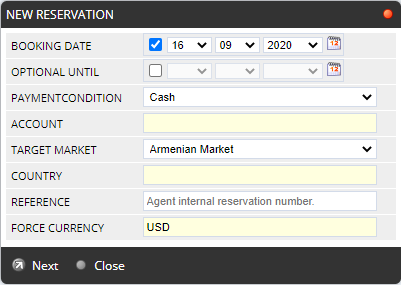
BOOKING DATE Standard it is the date of booking when reservation is done. To change the booking date to another date you need access permissions. OPTIONAL UNTIL If you set this date, the reservation will be automatically canceled unless there is a payment entry before. PAYMENT CONDITION Advance(Cash)/With rates. This option depends on company settings if allowed sales with rates. In OneSystem, you may define some advance payment discounts. ACCOUNT Choose a retailer from the auto-complete drop-down-box if this is a retailer (sub-agent) reservation. TARGET MARKET Defines which market prices will be used for packages and hotels. COUNTRY To limit offers based on where the client is living. (it is automatic if you set a retailer) REFERENCE Defines the reservation number of the retailer. As well as internal users, also retailers may use this field to enter their own reservation number or reminder to find reservations more easily. FORCE CURRENCY(obligatory) Defines the currency of the reservation. The default value is from the company default sales currency setting. A reservation can contain different products, however can have only one currency. On offer search, Onesystem will convert all prices to force currency.For example, if you are booking a hotel have sales prices in USD, but your reservation currency is EUR; OneSystem will convert all these offer prices automatically to EUR by using exchange rates defined by the accounting department. - Click on Next to open BASKET WINDOW which you will provide you search screen for different kinds of products.